
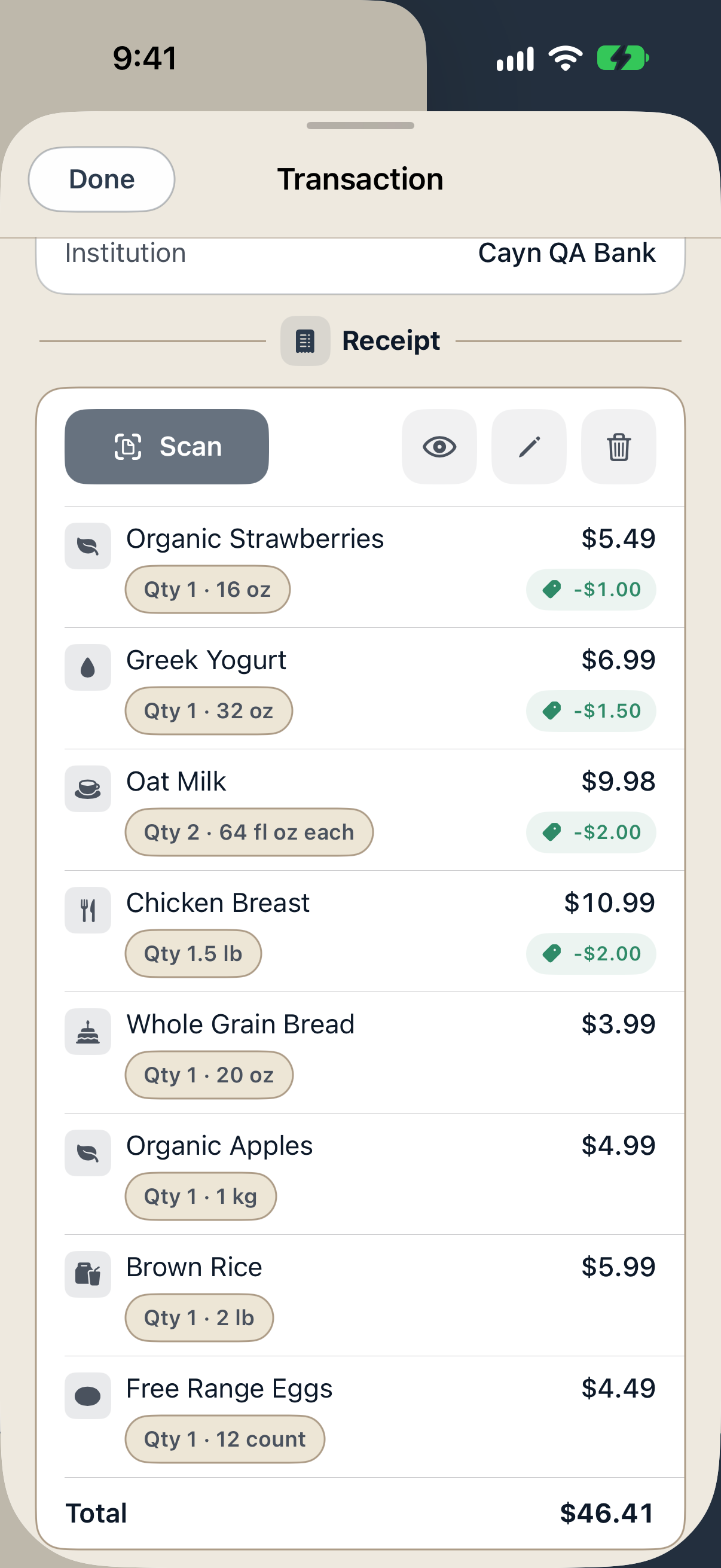
Your receipt, organized in one place
- Add a receipt. Scan a photo, upload a supported file or use a supported receipt from an optional Gmail connection.
- Review the items. Check names, quantities, sizes, discounts, tax and the receipt total. Correct any details the image or email did not make clear.
- Keep it with the transaction. Match the receipt to the relevant transaction when the records are available. Reopen the receipt from that transaction later.
What you can check
- Which items make up a large store purchase.
- Whether quantities and package sizes were read correctly.
- Whether a printed item discount is reflected in the receipt.
- Whether a matched posted charge differs from the receipt total.
Cayn also keeps price history from your own receipts. Where items and units are comparable, price memory helps you compare what you paid across stores and over time.
Find the details when you need them
Reopen the original receipt from your transaction when you need to check an item, prepare a return or review a charge.
You can correct unclear item details before saving. If a charge differs from the receipt, review both records before deciding what happened.
Questions about itemized receipts
Can I track receipt items without connecting a bank?
Yes. You can use manual accounts and transactions or supported CSV imports. A bank connection adds transaction records that can help Cayn find matches.
Can I keep personal and rental items on the same receipt?
Yes. With a Rental plan, you can review and assign the rental items to properties while leaving other items personal. Explore rental receipt splits.
Does every receipt produce perfect item details?
Receipt quality can affect the details. You can review and correct item names, quantities, discounts and totals before saving.