A small change can be easy to miss
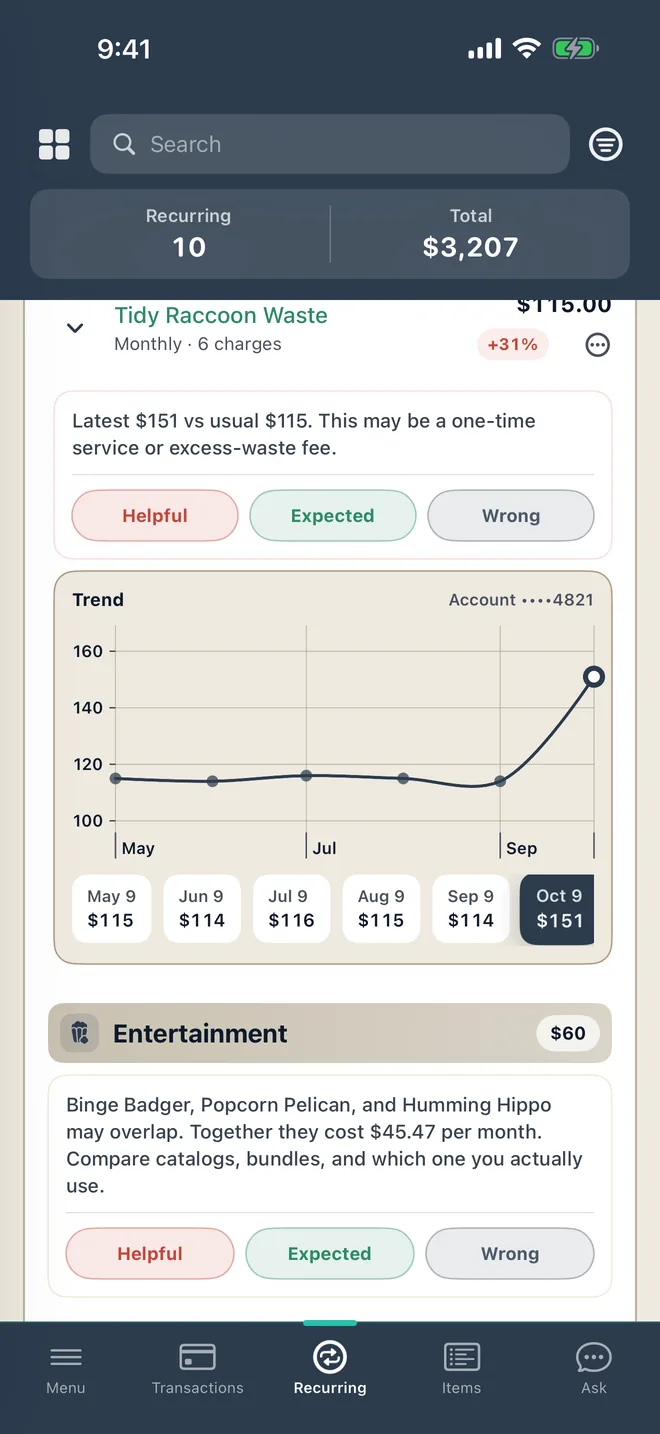
A service you usually pay $115 for suddenly costs $151. Cayn can highlight the increase and put the previous charges beside it, giving you the context to decide whether to look into it.
It can also flag potentially avoidable transaction fees. A flagged fee is a starting point for review; Cayn does not promise a refund or automatically change your bank account.
See what needs your attention
- Recurring bills that have increased.
- Transaction fees that may be avoidable.
- The related transactions and available payment history.
- Feedback options so you can mark an alert Helpful, Expected or Wrong.
Stay informed without checking every charge
Review insights on your dashboard and use your notification settings to choose how you hear about them. Open Recurring when you want to explore your regular payments in more detail.
Alerts depend on the records available to Cayn and when updates arrive. They do not block charges or replace your bank's own alerts.
Questions about bill and fee alerts
Do I have to connect a bank?
No. Supported CSV imports can also provide transaction records for review. A connected bank can bring in new transactions as updates become available.
Will Cayn cancel a payment or dispute a fee?
No. Cayn helps you notice and review charges. You decide what to do next.
What if the increase was expected?
Mark the alert Expected. If it helped you notice something, choose Helpful; if it is incorrect, choose Wrong.